Mobile event app platform

One mobile event app, built around you.

Replace paper programs and scattered tools with one digital hub. Schedules, networking, sponsor visibility, and AMS integration, all configurable for your organization and ready to launch fast.

Who it's for

Built for your type of organization

From the first registration to the post-event report – reliable, fast, and genuinely easy to run.

Associations and nonprofits

Streamline event management, increase member engagement, and give members a branded app that connects directly to your AMS.

Corporate events

Run conferences, trainings, and internal events with a branded app, fast check-in, and analytics your team can act on.

Event Agencies

Manage multiple client events, customize each experience, and scale delivery without fragmented tools or extra workload.

SOUND FAMILIAR?

Three problems most event teams know too well

If any of these sound like your last event, you are not alone. Here is what we hear most from event and education teams.

Your current app cannot do enough

Attendees expect personalized schedules, live polls, and networking tools. Many event apps still feel like a static PDF with links.

It does not talk to your AMS

Every event means re-entering data and chasing manual exports. Your member database and your event app live in separate worlds.

You are paying for less than you need

Other platforms charge enterprise rates for limited configuration, then hand you a generic app that is hard to justify to leadership.

WHAT EVENTPEDIA DOES

One configurable app. Fully yours.

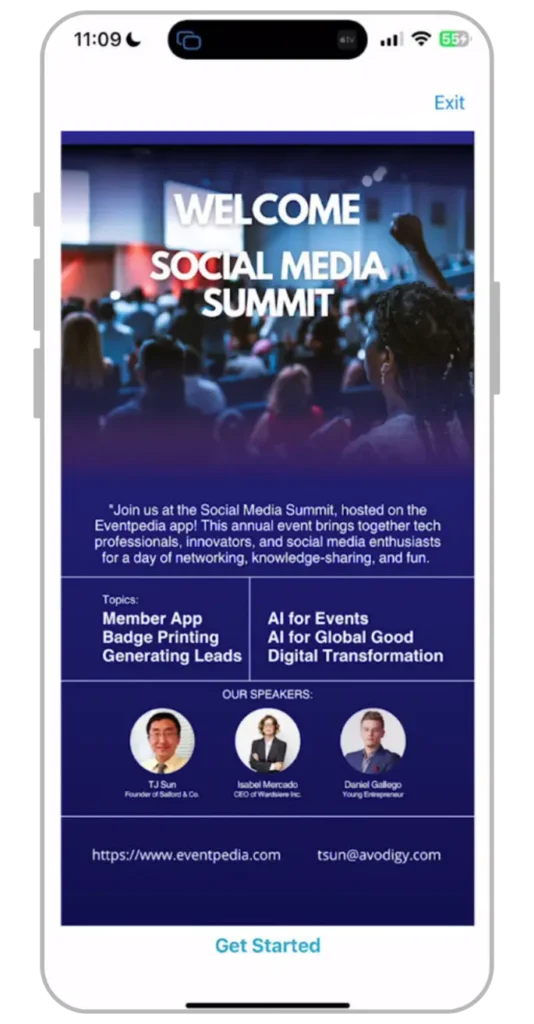
Eventpedia is a mobile event app platform for membership-driven organizations and event teams. You configure it in the Mobile Content Manager, brand it to your organization, and connect it to your existing systems without writing code.

Your current systems stay in place. Eventpedia fits around your event workflow, your brand, and your data, not the other way around.

Connects to your existing systems

NO CODE

NetForum AMS

Member records sync automatically.

LMS integrations

Pull education and course data into the app.

CRM export

Send lead and attendee data to your system of record.

CSV and custom API

Flexible for teams with specific data workflows.

What's included

Everything your event team needs in one place

Custom branding

Apply your colors, logo, and icons across the app. Configure the full look in the Mobile Content Manager, no developer or design team required.


Agenda and personalized schedules

Publish the full program and let attendees build their own agenda. Push real-time updates to every device the moment plans change.


Attendee networking

Profiles, private messaging, and matchmaking help attendees connect before, during, and after the event.


Sponsor and exhibitor visibility

Give sponsors banners, booth pages, and analytics that prove value and support renewal conversations.


Surveys, polls, and live Q&A

Collect session feedback, run live polls, and manage audience questions, then export the reports your team needs.

Analytics and reports

Track attendance, engagement, and session popularity, and share clear reports with leadership, sponsors, and partners.

Fast to launch

From setup to launch, without the wait.

01

Configure

Add sessions, speakers, exhibitors, maps, and content in the Mobile Content Manager. Connect your data sources where you need them.

02

Brand

Apply your logo, colors, and icons. Attendees open an experience that feels fully owned by your organization.

03

Launch

Publish the app, guide attendees to download and log in, then track engagement and push updates in real time.

Customer stories

See Eventpedia in action at real events

Ready to simplify your event app experience?

See Eventpedia in action with a live walkthrough, built around your event and your organization.

GET IN TOUCH

Talk to the Eventpedia team

Tell us about your event and your organization. We will show you how a branded Eventpedia app fits your team, connects to your AMS, and launches fast.


    From the blog

    Latest articles for event teams

    Event Planning & Operations
    December 2, 2025

    How to Improve Attendance Tracking With Check-In Tools

    Digital check-in that records who joined each session, then turns those scans into analytics you can plan your next event around.
    Sponsors & Exhibitors
    December 2, 2025

    Capture More Leads at Your Client’s Next Event

    Scan, qualify, and export leads in real time so your client’s sponsors leave the event with contacts worth following up.
    Event Technology & Trends
    October 11, 2025

    Best Check-In Tools for Fast-Paced Event Agencies

    Fast, reliable check-in built for agencies running back-to-back events, so lines stay short and every arrival is logged.