
Event badge printing software your own team runs
Badgepedia prints badges onsite as attendees arrive. They find their name, collect the badge, and walk in. Nothing is printed in advance, nothing is shipped to the venue, and no vendor stands behind the desk.
Self-service stations · Check-in and check-out logged · Runs on your own equipment
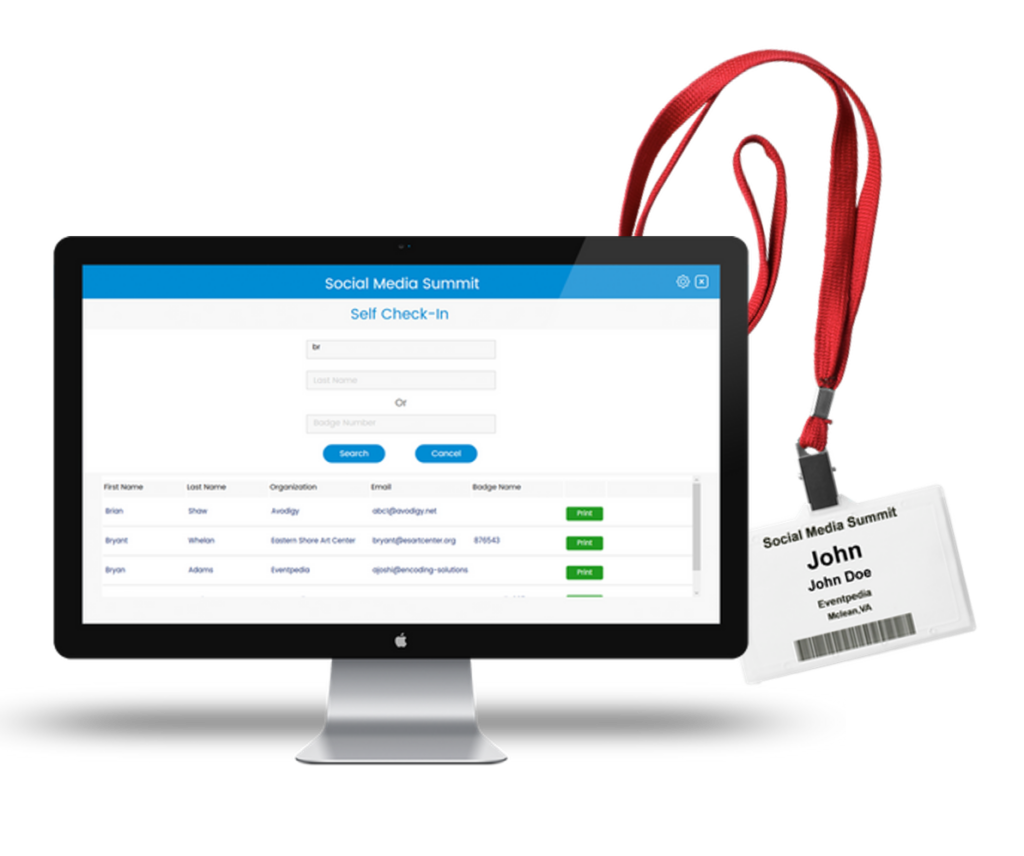
Badges printed when people arrive, not weeks before
Pre-printing means guessing. You print the full list, sort it alphabetically, ship the boxes, and then spend the morning writing names by hand for everyone who registered late or changed their title. Half the badges you printed go home in the box.
Badgepedia moves printing to the moment of arrival. An attendee types their name at the station, finds their record, and prints their own badge. Late registrations, corrections, and reprints all work the same way as everyone else, because there is no batch to be outside of.
For an association running a conference, that removes a whole category of morning problems: the box that did not arrive, the alphabetical table that needs four volunteers, and the stack of badges nobody collected.
Everything the registration desk needs
Attendee data and badge layouts live in the Mobile Content Manager, alongside the rest of your event.
Search and print
Attendees find their record by first and last name, or by badge number, and print. The search runs against your attendee data, so the details on the badge are the details you uploaded.
Built for self-service
Stations are designed for attendees to use themselves. Your staff supervises the desk and handles the exceptions instead of typing every name.
Check in and check out
Every badge printed is logged as a check-in. Attendees can also check out by searching their name, and both actions are stored for reporting.
One badge, used all event
The QR code on the badge is the same one exhibitors scan with Leadpedia. Print once at the door and the badge works on the show floor.
Badge layout designed for you
Send us the badge you want and our team builds the template in the Mobile Content Manager, mapped field by field to your attendee data.
Export the data
Everything captured at the desk sits in the back end and exports as raw data for your own analysis and reconciliation.
Your team runs it, start to finish
Badgepedia is a self-service solution your staff owns. You set up the stations, you decide how many to run, and you keep the equipment afterwards. There is no vendor to schedule, no onsite technician to pay for, and nothing to return at the end of the event.
Run one station for a small meeting or several for a large one. Each workstation is configured the same way, and either has its own printer or shares one across a router.
Because the equipment stays with you, the second event costs you badge stock and nothing else.
Three steps from data to a working desk
Send your data and badge
Upload your attendee list to the Mobile Content Manager, or use the list already there if you run the Eventpedia app. Send us a sample badge and our team builds the template.
Install and configure
Badgepedia installs on a Windows laptop with your Zebra printer attached. Choose your event, select the printer, and save. It is a one-time setup per workstation.
Open the desk
Test one badge, then open the station. Attendees search, print, and walk in.
Every badge printed is a record you keep
Each print, check-in, and check-out is captured in the back end against the attendee it belongs to. You can export the raw data at any point, during the event or after it, and use it for attendance reconciliation, sponsor reporting, or your own records.
If you want Badgepedia to work against a system you already run, we can build an integration so it searches that system directly and writes back to it, setting flags or creating records so everything is tracked in one place. That requires an API on the other side and is quoted as custom development.
Runs alongside the rest of your event
Badgepedia is one piece of the Eventpedia platform. The badge it prints is used by the products that run after the doors open.
Mobile Event App
The branded app your attendees use for schedules, profiles, and networking.
Lead Retrieval
Exhibitors scan the badge Badgepedia printed and export their leads.
Session Check-In
Attendance recorded for each session, exported when you need it.
What changes when badges are printed on arrival
Printed in advance
Printed with Badgepedia
Badge printing questions we get
What equipment do we need?
A Windows laptop, a Zebra GK420D or ZD420D direct thermal printer, and direct thermal badge stock at four by three inches. A cutter is available for the ZD420D and trims each badge as it prints. You can buy all of it from any supplier you like.
Do you rent equipment?
Not at present. Owning the printer means it goes to your next event with you, and there is nothing to return. These are thermal printers, so there is no toner or ribbon to replace, and they print hundreds of thousands of badges before they need replacing.
Can we print in color?
Badges print in black and white. If you want color on the badge, order badge stock with your logo or graphics pre-printed and tell us which area to leave clear, and Badgepedia will print the attendee details around it.
Can we use a printer we already own?
Badgepedia is configured for the Zebra models above. If you have a different Zebra label printer, send us the model and our team will check whether it works.
Can we run more than one station?
Yes. Set up as many workstations as your entrance needs, configured the same way. Each can have its own printer, or several can share one printer across a router.
Does the badge work with lead retrieval?
Yes. The QR code Badgepedia prints is the code exhibitors scan with Leadpedia, so one badge covers the door and the show floor.
Where does the attendee data come from?
You upload your attendee list to the Mobile Content Manager. If you already run the Eventpedia event app, the list is usually there already. Everything printed on the badge has to exist as a field in that data.
Does it work without internet?
See Badgepedia before your next registration desk
Book a live walkthrough with our team. Tell us how many people arrive, over how many hours, and what goes on the badge, and we will show you how the desk would run.
- A live call with our team. No obligation.
- Equipment and badge stock explained plainly
- Straight answers, no commitment


Smart event management for conferences and corporate meetings.
Contact Us
© 2026 EVENTPEDIA | All rights reserved