
The mobile event app you configure, brand, and launch fast
Eventpedia gives associations, corporate teams, and agencies one branded mobile event app for schedules, networking, and sponsors. You configure it yourself, connect it to the systems you already use, and put it in attendees’ hands without writing code.
Configurable modules · Your branding · AMS and LMS integrations
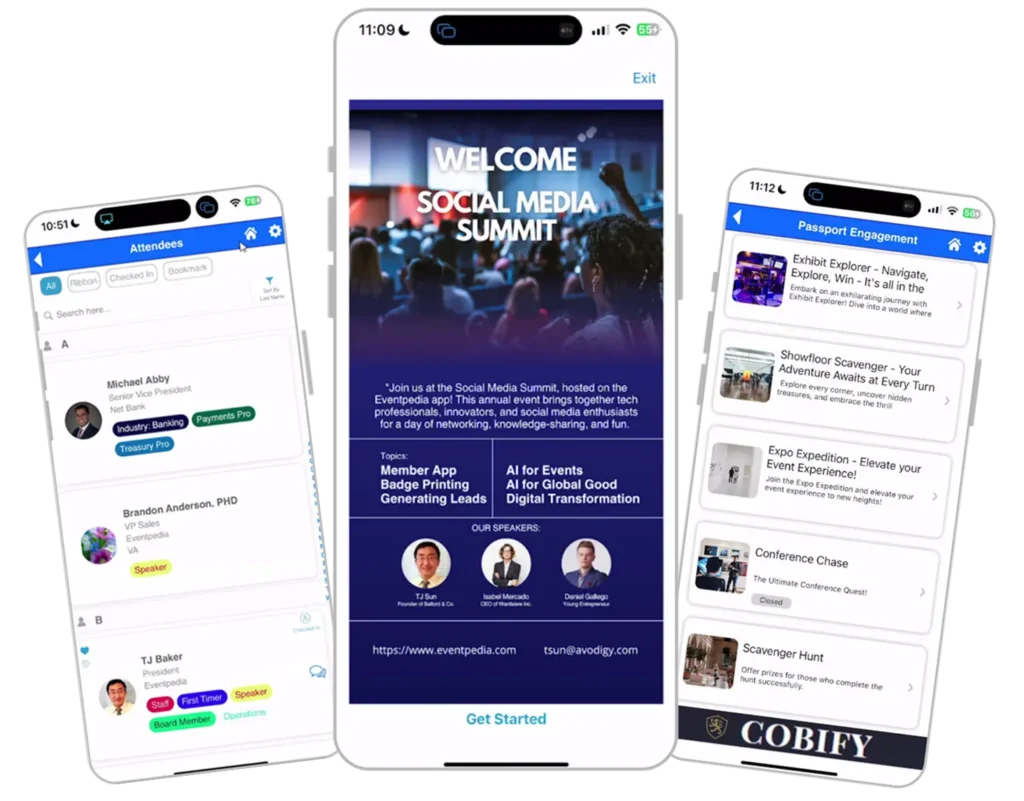
One mobile app for your event, built on modules you choose
A mobile event app replaces the printed program, the schedule PDF, and the three separate tools your team stitches together every year. Attendees open one app and find the agenda, speaker profiles, exhibitor booths, session materials, and everyone else in the room.
Eventpedia is that app, and you shape it. Your events team turns modules on and off in the Mobile Content Manager, our desktop admin platform. Add sessions, upload speakers, publish maps, open networking. No developer sits between you and a change to tomorrow’s agenda.
Associations run member conferences and education programs on it. Corporate teams run sales kickoffs and internal summits. Agencies run multiple client events under one branded app. The modules differ. The platform does not.
Everything mobile event apps should do, in one place
Every feature below is live in the platform today. Turn on what your event needs and leave the rest off.
Agenda and personalized schedules
Publish the full program and let each attendee build a personal agenda from it. Push a room change or a speaker swap and every phone updates at once. Attendees stop asking your staff what happens next.
Attendee networking
Attendee profiles, private messaging, and matchmaking help people find each other before the doors open. Members meet the peers they came to meet instead of leaving with a tote bag and no contacts.
Sponsor and exhibitor visibility
Rotating banners, booth pages, and ad space give sponsors placement they can see. Pull the engagement numbers afterward and your renewal conversation starts with data instead of goodwill.
Surveys, polls, and live Q&A
Run live polls in a session, collect audience questions without a roaming microphone, and send feedback surveys before attendees reach the parking lot. Export the results as reports.
Analytics and custom reports
Track session attendance, app engagement, and exhibitor traffic. Build the custom reports your board, your leadership, or your client asks for.
Offline access and hybrid sessions
Attendees reach schedules and content when the venue wifi gives out. For hybrid programs, run web meetings inside the app so remote members join the same event.
Also included: interactive maps, push notifications and announcements, speaker and exhibitor profiles, gamification, an event photo feed, and multiple events under a single branded app.
Your brand, your modules, your control
Most event apps hand you a template and a logo slot. Eventpedia hands you the controls.
Apply your colors, your icons, and your logo across the app until attendees see your organization, not ours. Choose which modules appear and how they are named. Reorder the home screen. Change content during the event and watch it land on devices in real time.
Your events team does this in the Mobile Content Manager without a design team or a developer. When you need something the platform does not do yet, the Eventpedia Team builds it. Custom development on request is part of how we work, not an upsell tier.
From setup to launch, without the wait
01
Configure
Add sessions, speakers, exhibitors, maps, and content in the Mobile Content Manager. Connect your data sources where you need them.
02
Brand
Apply your logo, colors, and icons. Attendees open an experience that feels fully owned by your organization.
03
Launch
Publish the app, guide attendees to download and log in, then track engagement and push updates in real time.
Non-branded apps launch in days. A fully branded app takes about a month, once you have provided account access and have Apple and Google developer accounts in place.
Connects to the systems you already run
Eventpedia is not a registration system and not a CRM. It sits alongside them. Member records, course data, and attendee lists move between your systems and your app without your team retyping a spreadsheet at midnight.
Associations connect their AMS, including NetForum, so member data flows into the app and event activity flows back. Education teams pull course and credit data from their LMS.
Eventpedia does not run registration itself. We work with registration partners, including Conexsys and RegFox, so attendee data reaches the app without your team rebuilding a list by hand.
Running an association AMS?
The app is the hub. These run on top of it.
Event teams rarely need only an agenda. Lead retrieval, check-in, badges, and live audience tools usually arrive as four more vendors and four more invoices. Eventpedia runs them from the same platform.
Lead Retrieval
Exhibitors scan attendee badges, add notes, and export leads as CSV or PDF. No rental scanners to ship back.
Session Check-In
Record attendance for each session and export the results afterwards.
Polls and Quizzes
Live polls, quizzes, and Q&A inside sessions, with results your team can export.
Badge Printing
Print attendee badges on site, tied to the same attendee data as the app.
Two more products extend the same platform. Leadpedia is the exhibitor lead retrieval app that replaces rented scanning devices. Memberpedia keeps associations connected to members between events, not only during them.
See it running at a real conference

They have always felt more like a strategic partner than a software vendor.
The American Society of Appraisers ran its flagship hybrid conference on a branded Eventpedia app. Read what their team configured and how it worked.
Questions event teams ask us
What is a mobile event app?
A mobile event app is a single app your attendees download for one event or one organization. It holds the agenda, speaker and exhibitor profiles, maps, networking, sponsor placements, and live session tools such as polls and Q&A. It replaces the printed program and the scattered PDFs, and it lets organizers push changes to every attendee at once.
Can we brand the app to our organization?
Yes. Apply your colors, icons, and logo across the app, and choose which modules appear and what they are called. Attendees see your organization throughout. Your team makes these changes in the Mobile Content Manager without a developer.
Does it integrate with our AMS or LMS?
Yes. Eventpedia connects to AMS platforms including NetForum, to LMS platforms, and to CRMs, plus CSV and custom API options for specific workflows. Your existing systems stay in place. The app works alongside them instead of replacing them.
How long does it take to launch?
Non-branded apps launch in days. A fully branded app takes about a month from the point you give us access to your accounts. One condition drives that timeline: your organization needs its own Apple and Google developer accounts. If you already have them, a month is realistic. If you do not, setting them up first makes the schedule harder to predict, so tell us early and we will plan around it.
Can we run more than one event in the app?
Yes. Run multiple events under one branded app. Associations use this for an annual conference plus regional programs. Agencies use it across client events.
Does it work without internet?
Yes. Attendees reach schedules and content offline, which matters in hotel ballrooms and conference centers where the wifi struggles.
How is our data handled?
Data moving between attendees, organizers, and our servers is encrypted in transit, and event data sits on secured, access-controlled infrastructure hosted by Azure. Access is limited to authorized personnel on a need-to-know basis. Your event data stays segregated and stays yours. We do not sell attendee information or use it outside the services we provide. Organizers control which attendee details appear in the app, and data can be exported or removed after the event on request.
See the app configured around your event
Book a live walkthrough with the Eventpedia Team. Tell us your event and your systems, and we will show you the app your attendees would actually open.
- A walkthrough built around your event
- AMS integration explained clearly
- Straight answers, no commitment

Smart event management for conferences and corporate meetings.
Contact Us
© 2026 EVENTPEDIA | All rights reserved